

For Amazon sellers, understanding the ungated meaning and the difference between gated and ungated categories is crucial to your success. In this comprehensive guide, we’ll explore what “ungated” means in the Amazon selling ecosystem, how to navigate category restrictions, and share proven strategies for expanding your product portfolio through the ungating process.
What Does “Ungated” Mean on Amazon?
The ungated meaning in the Amazon marketplace refers to product categories that don’t require special approval from Amazon before you can list and sell items within them. These categories have no barriers to entry or “gates,” making them easily accessible to all sellers, especially beginners.
When a category is ungated, sellers can immediately create listings and start selling without submitting additional documentation or going through approval processes. Understanding this ungated meaning is vital, as it makes these categories the perfect starting point for new Amazon sellers who want to establish their business quickly.
The term “ungated” is essentially the opposite of “gated” categories, which require sellers to go through an approval process before they can list products for sale.
Types of Amazon Ungated Categories

To fully grasp the ungated meaning in Amazon’s ecosystem, sellers should know that Amazon currently offers two types of ungated categories:
Fully Ungated Categories
These categories have no restrictions whatsoever. Any seller can list products in these categories without approval. As of 2025, fully ungated categories include:
- Amazon Device Accessories
- Amazon Kindle
- Automotive & Powersports
- Beauty
- Books
- Camera & Photo
- Cell Phones & Accessories
- Home & Garden
- Industrial & Scientific
- Kindle Accessories and Amazon Fire TV Accessories
- Major Appliances
- Musical Instruments
- Sports
- Tools & Home Improvement
These categories provide an excellent entry point for new sellers who want to start generating sales while building their Amazon business reputation.
Partially Ungated Categories
These categories are generally open but may contain specific brands or products that require approval. While the category itself is ungated, certain products within these categories might be restricted:
- Baby Products (excluding apparel)
- Consumer Electronics
- Health & Personal Care
- Office Products
- Outdoors
- Personal Computers
- Pet Supplies
- Software
- Toys & Games
- Video Games
When selling in partially ungated categories, it’s essential to check individual product restrictions before investing in inventory. Even within an ungated category, specific brands or high-value items may require separate approval.
Understanding Brand-Level Restrictions
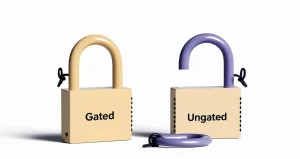
It’s important to note that even when applying the ungated meaning to categories, Amazon implements two levels of gating restrictions:
- Category-level restrictions: Apply to all products within a particular category
- Brand/product-level restrictions: Apply only to specific brands or products
This means that while a category might be ungated, certain brands within that category might still require approval. For example, the Beauty category is generally ungated, but premium beauty brands often require separate approval from Amazon.
Why Amazon Implements Category Gating
Amazon has strengthened its category restrictions over time for several important reasons:
- Quality Control: By restricting certain categories, Amazon maintains product quality and authenticity, particularly for high-risk items.
- Customer Protection: Gating helps protect customers from potentially harmful, counterfeit, or substandard products.
- Brand Protection: Restrictions prevent unauthorized sellers from listing branded products without proper authorization, protecting both brands and consumers.
- Regulatory Compliance: Certain product categories face stricter regulations (like supplements or electronics), and gating ensures sellers meet these requirements.
- Marketplace Regulation: Gating helps Amazon manage supply and demand while preventing category oversaturation.
Amazon’s gating policies continue to evolve, with the platform generally increasing restrictions over time rather than reducing them. This trend underscores the importance of understanding both current restrictions and how to navigate them.
Benefits of Entering Gated Categories
While ungated categories offer a quick start, there are significant advantages to unlocking gated categories:
- Reduced Competition: Many sellers avoid the approval process, resulting in less competition in gated categories. This can mean better profit margins and more visibility for your products.
- Enhanced Credibility: Getting approved for gated categories signals to customers that you meet Amazon’s quality standards. This builds trust in your brand and listings.
- Product Diversification: Access to more categories allows you to expand your product portfolio and reduce risk by not relying on a single product type.
- Premium Features: Some Amazon advertising features and programs may only be available to sellers in certain categories.
- Higher-Value Products: Gated categories often contain higher-priced items with better profit margins than commonly accessible ungated categories.
- Increased Sales Opportunities: More categories mean more potential customers and higher sales potential throughout the year.
The effort required to get ungated in restricted categories often pays off through improved business stability and higher profits.
How to Check if a Product is Gated
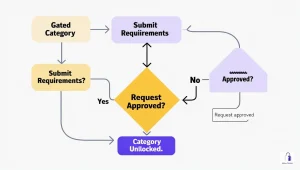
Before sourcing inventory, it’s essential to verify if you can sell in a particular category:
- Log into Seller Central (UK) & (US)
- Go to “Inventory” → “Add a Product”
- Search for a similar product or browse categories
- If you see a “Listing limitations apply” message, the product or category is gated
Performing this check before purchasing inventory can save you significant time and money. Many sellers make the mistake of buying products first, only to discover they can’t sell them due to gating restrictions.
How to Get Ungated on Amazon
If you want to sell in a gated category, here’s the standard process:
- Log into Seller Central and navigate to “Inventory” → “Add a Product”
- Search for the product you want to sell
- Click “Show limitations” and then “Request approval”
- Complete the Amazon Seller Request Form
- Submit required documentation, which typically includes:
- Supplier invoices (less than 180 days old)
- Proof of authenticity
- Business documentation
- Product compliance certificates (if applicable)
- Approval fees (for certain categories)
The specific requirements vary by category. For example, selling in the Jewelry category requires different documentation than selling in Grocery or Health & Personal Care.
If your initial application is rejected, don’t be discouraged. Many successful sellers report being approved after multiple attempts, as different Amazon representatives may review subsequent applications.
Common Challenges in the Ungating Process
Sellers often face several challenges when trying to get ungated:
- Invoice Requirements: Amazon has strict requirements for invoices, including that they must be from manufacturers or authorized distributors, not from retail stores.
- Minimum Purchase Quantities: Some categories require proof of purchasing a minimum quantity (often 10 units) from an authorized supplier.
- Authenticity Documentation: For branded items, Amazon may require authorization letters from the brand owner.
- Changing Requirements: Amazon occasionally changes its ungating requirements without notice, making the process unpredictable.
Despite these challenges, the benefits of accessing gated categories make the effort worthwhile for serious Amazon sellers.
How FBAmultitool Simplifies the Ungating Process
Many sellers find the ungating process tedious and time-consuming. FBAmultitool offers an innovative auto-ungate feature that streamlines this process significantly. Once logged into Seller Central, FBAMultiTool can attempt to ungate categories without requiring an invoice in many cases, saving you time and effort in expanding your selling permissions.
The tool works by automating the approval request process and leveraging optimized application methods that have higher success rates than manual applications. This automation can dramatically reduce the time from hours to minutes while increasing your chances of approval.
Strategic Approach to Category Expansion
Successful Amazon sellers typically follow a strategic approach to category expansion:
- Start with ungated categories to establish seller metrics and feedback
- Identify profitable gated categories with manageable competition
- Prepare proper documentation before applying for approval
- Use tools like FBAmultitool to streamline the application process
- Be persistent if initial applications are rejected
This methodical approach allows sellers to gradually expand their product offerings while maintaining profitability and minimizing risk.
Final Thoughts
Understanding the ungated meaning and the difference between gated and ungated Amazon categories is essential for any serious Amazon seller. While ungated categories provide an excellent starting point for beginners, strategically expanding into gated categories can significantly boost your Amazon business by reducing competition, increasing credibility, and opening new sales opportunities.
As Amazon’s policies continue to evolve, staying informed about category requirements and restrictions will help you navigate the marketplace successfully and grow your e-commerce business. Tools like FBAmultitool can give you a competitive advantage by simplifying the ungating process and helping you access profitable restricted categories faster than your competitors.
Remember that even if your application is initially denied, persistence often pays off. Many sellers report success after multiple attempts, as different Amazon representatives may review your subsequent applications. With the right approach and tools, you can successfully navigate Amazon’s gating system and build a thriving e-commerce business across multiple product categories.


