

If you’re looking to save money on Amazon, knowing how to check historical Amazon prices can be a game changer. Prices on Amazon fluctuate constantly, and having access to past pricing data can help you spot the best deals. By using various tools and techniques, you can track price changes and make informed decisions about when to buy. In this article, we’ll explore how to effectively check historical Amazon prices using different strategies and tools.
Key Takeaways
- Use tools like Keepa and CamelCamelCamel to check historical Amazon prices.
- Set up price alerts to be notified of drops in product prices.
- Analyze price history charts to understand pricing trends over time.
- Access price tracking apps on mobile devices for convenience.
- Compare prices across different platforms to find the best deals.
- Free Keepa Graph Included with FBAmultitool
Utilizing Price Tracking Tools

Price tracking tools are super helpful when you’re trying to snag a good deal on Amazon. Instead of constantly checking prices yourself, these tools do the work for you. They monitor price changes and can even send you alerts when something you want goes on sale. It’s like having a personal price-watching assistant!
Overview of Keepa
Keepa is a popular tool for tracking Amazon prices. It provides detailed price history charts, so you can see how the price of a product has changed over time. This is really useful for figuring out if a current “deal” is actually a good deal or just a temporary price drop. Keepa also lets you set up price alerts, so you’ll get notified when the price drops to your desired level. It’s a great way to make sure you don’t miss out on a bargain. You can use Keepa to view price history and make informed decisions.
Exploring CamelCamelCamel
CamelCamelCamel is another well-known price tracking website. It offers similar features to Keepa, including price history charts and price drop alerts. One cool thing about CamelCamelCamel is that it tracks prices from third-party sellers as well as Amazon directly. This can be helpful for finding the absolute lowest price available. Plus, it’s got a simple interface that’s easy to use, even if you’re not super tech-savvy.
Benefits of Using Price Trackers
Using price trackers offers several advantages:
- Save Money: By tracking price history, you can identify the best time to buy a product and avoid overpaying.
- Time-Saving: Instead of manually checking prices, price trackers automate the process and notify you of price drops.
- Informed Decisions: Price history data helps you make informed purchasing decisions by revealing pricing patterns and trends.
Price trackers are a great way to take control of your online shopping and ensure you’re always getting the best possible deal. They empower you to shop smarter and save money on the products you want.
Setting Up Price Alerts
It’s super annoying to constantly check Amazon for price drops, right? Luckily, you don’t have to! Setting up price alerts is a game-changer for snagging the best deals without the constant manual checking. It’s all about being proactive and letting the tools do the work for you.
Creating Alerts on Keepa
Keepa is a pretty popular tool for tracking Amazon prices, and setting up alerts is straightforward. First, you need to install the Keepa browser extension or visit their website. Once you’re on the Amazon product page you’re interested in, Keepa will display a price history chart. Right above the chart, you’ll find options to set your desired price. Enter the price you’re willing to pay, and Keepa will notify you via email or browser notification when the price drops to or below your target.
Using CamelCamelCamel for Notifications
CamelCamelCamel works similarly to Keepa. You can either use their website or install the Camelizer browser extension. Once installed, navigate to the Amazon product page. CamelCamelCamel will show you the price history, and there’s a section to create price watches. You enter your desired price, your email address, and voilà, you’re set! They’ll send you an email when the price drops. One cool thing about CamelCamelCamel is that you can specify whether you want to be notified when Amazon’s price drops or when a third-party seller’s price drops.
Customizing Alert Preferences
Customizing your alert preferences is key to avoiding notification overload. Both Keepa and CamelCamelCamel offer options to fine-tune your alerts. For example, you can set a specific timeframe for the alert to be active, so you don’t get notifications months after you’ve lost interest in the product. You can also choose the type of notification you receive – email, browser notification, or even Telegram alerts with Keepa. It’s worth spending a few minutes to configure these settings to make sure you’re only getting the alerts that matter to you.
Setting up price alerts is not just about saving money; it’s about saving time and mental energy. Instead of constantly checking prices, you can focus on other things and trust that you’ll be notified when the price is right. It’s a simple yet effective way to be a smarter shopper.
Analyzing Price History Charts
Understanding Price Trends
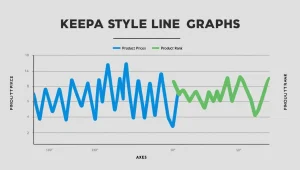
Okay, so you want to check historical amazon prices and see if that blender is actually a good deal? Price history charts are your friend. These charts visually represent how a product’s price has changed over time. Spotting trends is key. Is the price generally going up, down, or staying the same? This gives you a sense of whether you should buy now or wait. For example, if you see a consistent downward trend, it might be wise to hold off for a bit.
Interpreting Historical Data
Looking at the raw data can be intimidating, but it’s not that bad. Pay attention to the price fluctuations. Big spikes might indicate temporary sales or limited-time offers. Dips could signal clearance events or seasonal discounts. Also, note the dates of these changes. Did the price drop every November? That could mean a Black Friday deal. Understanding these patterns helps you predict future price movements. You can use historical price data to your advantage.
Comparing Prices Over Time
Comparing prices over different time periods is super useful. Look at the price history over the last month, three months, six months, and even a year. This gives you a broader perspective. Are there consistent patterns? Are prices generally higher or lower now compared to last year? This comparison helps you determine if the current price is a good deal relative to its historical value.
By analyzing price history charts, you can make smarter purchasing decisions. You’ll be able to identify the best times to buy and avoid getting ripped off by temporary price hikes. It’s all about being informed and patient.
Accessing Price History on Mobile Devices
It’s super convenient to check Amazon price history while you’re on the go. You don’t have to be stuck at your computer to see if that item you’re eyeing is at its lowest price. Here’s how you can do it:
Using Apps for Price Tracking
There are several apps available that let you track Amazon prices directly from your phone. These apps often provide a more streamlined experience compared to using a mobile browser.
- Keepa has a mobile app that mirrors its desktop functionality. You can view price history charts, set up alerts, and track multiple products.
- CamelCamelCamel doesn’t have a dedicated app, but their mobile site works pretty well.
- Some apps offer additional features like barcode scanning to quickly find products on Amazon and view their price history.
Mobile Browser Extensions
While dedicated mobile browser extensions are less common than desktop versions, there are still ways to get price history info on your phone’s browser. For example, you can use the mobile version of the Camelizer extension.
- Some browsers, like Kiwi Browser on Android, support desktop extensions, so you can install extensions like Keepa directly.
- Alternatively, you can simply visit the websites of price tracking tools like Keepa or CamelCamelCamel in your mobile browser.
- Make sure your browser is up to date for the best compatibility.
Viewing Price History on iOS
Apple users have a few options for checking price history on their iPhones or iPads. You can use price tracking apps that support iOS devices or access web-based services through Safari or another browser.
- Download Keepa from the App Store.
- Use the mobile version of CamelCamelCamel in Safari.
- Consider using a browser that supports desktop extensions, if you prefer that experience.
Integrating Browser Extensions
Installing Keepa Extension
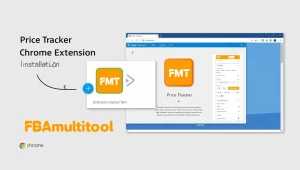
Okay, so you want to get serious about tracking Amazon prices? Browser extensions are where it’s at. First up, let’s talk about Keepa. Installing the Keepa extension is pretty straightforward. You just head to the Chrome Web Store (or whatever browser you use), search for “Keepa,” and hit install. Once it’s installed, you’ll see a little Keepa icon in your browser toolbar. Clicking that icon when you’re on an Amazon product page will bring up a detailed price history chart right there on the page. No more bouncing between websites! Something to note! FBAmultitool has Keepa interactive graph integrated into it for no additional cost!
Using Honey for Price Tracking
Next up is Honey. Honey is more than just a price tracker; it also hunts for coupon codes. To use Honey for price tracking, install the Honey extension from your browser’s web store. When you’re viewing a product on Amazon, Honey will automatically search for available coupons and also show you a basic price history. It’s not as detailed as Keepa, but it’s a nice all-in-one solution. Honey can help you find the best deals.
Benefits of Browser Integration
Why bother with browser extensions at all? Well, here’s the deal:
- Convenience: You don’t have to leave the Amazon product page to see the price history. It’s all right there.
- Time-Saving: No more manually checking prices every day. The extension does it for you.
- Informed Decisions: You can quickly see if a “deal” is really a deal or just a marketing trick.
Browser extensions make price tracking so much easier. Instead of constantly checking Amazon, you can just glance at the extension and know if it’s a good time to buy. It’s like having a personal price-watching assistant.
Plus, many extensions, like the Camelizer browser extension, offer features like price alerts, so you get notified when the price drops to your desired level.
Finding the Best Time to Buy
Knowing when to buy something can save you a lot of money. It’s not just about finding a sale; it’s about understanding price patterns and making smart choices. Let’s explore how to pinpoint the perfect moment to make a purchase.
Identifying Seasonal Price Drops
Certain times of the year are known for better deals. Think about when retailers are trying to clear out old inventory or capitalize on specific holidays. For example, electronics often see price cuts around Black Friday, while summer clothing might be cheaper at the end of the season. Keeping an eye on these trends can really pay off. Also, don’t forget to check for reliable sellers during these periods to ensure a smooth shopping experience.
Using Historical Data for Predictions
Historical data is your friend. By looking at past price changes, you can get a sense of when a product is likely to be at its lowest. Price tracking tools are great for this, as they show you how prices have fluctuated over time. This helps you predict future price movements and plan your purchases accordingly.
Strategies for Timing Purchases
Here are some strategies to consider:
- Monitor Price History: Use tools like Keepa or CamelCamelCamel to track price changes.
- Set Price Alerts: Get notified when the price drops to your desired level.
- Consider Seasonal Trends: Be aware of times of year when prices are typically lower.
Waiting for the right moment can lead to significant savings. Don’t rush into a purchase if you suspect the price might drop soon. Patience can really pay off when it comes to online shopping.
Also, keep in mind that major sale events like Black Friday, Cyber Monday, and Amazon Prime Day often feature a wide range of products at discounted rates. Keeping an eye on the price history can also indicate patterns that signal opportune times to buy.
Comparing Prices Across Platforms
It’s easy to get tunnel vision when shopping online, especially on a behemoth like Amazon. But smart shoppers know that the best deals aren’t always on a single site. Let’s explore how to broaden your horizons and find the absolute lowest prices.
Using Third-Party Price Comparisons
There are a bunch of websites and tools designed to compare prices across multiple online retailers. These sites crawl the web, tracking prices for millions of products. Using these tools can quickly reveal if Amazon’s price is truly the best available. Some popular options include Google Shopping, PriceGrabber, and Shopzilla. These sites let you search for a specific product and then show you a list of prices from different retailers, including shipping costs.
Identifying Best Deals
Finding the best deal isn’t just about looking at the lowest price. You also need to consider shipping costs, return policies, and the seller’s reputation. A slightly higher price from a reputable seller with free shipping and easy returns might be a better deal than a rock-bottom price from an unknown seller with a questionable return policy. Always read the fine print and check seller reviews before making a purchase. You can use Amazon research tools to help you make informed decisions.
Understanding Market Fluctuations
Prices online are constantly changing due to a variety of factors, including supply and demand, competitor pricing, and sales events. Understanding these market fluctuations can help you time your purchases for maximum savings. For example, prices on electronics often drop after a new model is released. Similarly, prices on seasonal items like clothing and decorations tend to drop significantly at the end of the season.
Keeping an eye on these trends can help you predict when prices are likely to fall, allowing you to snag the best deals. Don’t be afraid to wait a few weeks or months if you’re not in a rush. Patience can often pay off with significant savings.
Wrapping It Up
So there you have it! Checking historical prices on Amazon isn’t as tricky as it might seem. With tools like Keepa and CamelCamelCamel, you can easily see how prices have changed over time. Just pop in a product link, and you’ll get a clear view of its price history. Plus, using browser extensions makes it even easier to keep an eye on things while you shop. Remember, knowing the price history can help you snag the best deals and avoid overpaying. Happy shopping!
Frequently Asked Questions
What tools can I use to check historical Amazon prices?
You can use tools like Keepa and CamelCamelCamel to check the price history of Amazon products. These tools allow you to see how prices have changed over time.
How do I set up price alerts for Amazon items?
To set up price alerts, you can create an account on Keepa or CamelCamelCamel. Then, just enter the product link and choose how often you want to be notified about price changes.
Can I view price history on my phone?
Yes, you can view price history on your mobile device by using price tracking apps or websites in your mobile browser.
Are there browser extensions for tracking Amazon prices?
Yes, you can install browser extensions like Keepa or Honey. These extensions show price history charts directly on Amazon product pages.
How can I find the best time to buy an item on Amazon?
You can look for seasonal price drops and use historical price data to help decide when to make a purchase.
Is it possible to see previously listed prices on Amazon?
While Amazon doesn’t show past prices directly, tools like Keepa and CamelCamelCamel can display the history of price changes, including previous lower prices.


