

What You’ll Learn in This Article:
-
Detailed breakdown of Keepa subscription costs and pricing plans
-
Feature comparison between free and paid Keepa subscriptions
-
Step-by-step guide to signing up for Keepa
-
Money-saving tips for Keepa subscriptions
-
Alternative tools including FBAmultitool that offer Keepa integration
-
Comprehensive API pricing options for developers
-
FAQs about Keepa subscriptions and payment policies
Introduction
A Keepa subscription is an essential investment for serious Amazon sellers looking to track product price history and market trends. With plans starting at €19 monthly (approximately $21), Keepa offers powerful data tracking capabilities that can significantly improve your sourcing decisions and profit margins. Understanding the various Keepa subscription options is crucial for optimizing your eCommerce toolkit while managing costs effectively.
In this comprehensive guide, we’ll explore everything you need to know about Keepa pricing, from the free plan’s limitations to the advanced features of paid subscriptions. We’ll also discuss how FBAMultitool offers an attractive alternative by embedding Keepa functionality at a lower starting price of just $12.45 (with code WOW30).
Keepa Subscription Plans: Free vs. Paid

Let’s break down the standard Keepa subscription options available:
| Plan Type | Free Plan | Paid Plan |
| Monthly | €0 | €19 (≈$21) |
| Yearly | €0 | €189 (≈$209) – 17% savings |
| Discounts | N/A | Annual plan saves €39/year |
One of the key advantages of Keepa’s pricing structure is the perpetual free plan option. Unlike many competitors that only offer limited-time trials, Keepa’s free subscription never expires, allowing you to test core features indefinitely before committing to a paid Keepa subscription.
Free Plan Details
The free Keepa subscription is designed primarily as a taste of what’s possible with the platform. While useful for casual Amazon shoppers, it has significant limitations for serious sellers:
- No access to the Data Access toolset (0% quota)
- Limited tracking capabilities
- No historical data graphs or interactive charts
- Basic price alerts only
Paid Plan Advantages
The paid Keepa subscription unlocks the platform’s full potential with features essential for professional Amazon sellers:
- Complete Data Access toolset (100% quota)
- Ability to import/export up to 24,000 ASINs daily
- 5% quota replenishment every hour
- Full historical pricing data and interactive graphs
- Buy box statistics and opportunity tracking
For most serious Amazon sellers, the Keepa subscription cost is easily justified by the potential profit opportunities identified through its comprehensive data analysis tools.
Keepa API Subscription Options

Beyond the standard plans, Keepa offers specialized API subscriptions for developers and advanced users. This token-based system grants programmatic access to Keepa’s vast product database.
Each Keepa API subscription generates a specific number of tokens per minute, with all tokens expiring 60 minutes after creation. Here’s the complete API pricing breakdown:
| API Plan | Tokens per Minute | Price (€) |
| Basic | 20 | €49 |
| Standard | 60 | €129 |
| Professional | 250 | €459 |
| Business | 500 | €879 |
| Enterprise I | 1,000 | €1,499 |
| Enterprise II | 2,000 | €2,499 |
| Enterprise III | 3,000 | €3,499 |
| Enterprise IV | 4,000 | €4,499 |
For developers building custom Amazon seller tools, these API Keepa subscription options provide flexible scaling options based on usage requirements.
Feature Comparison: What Do You Get with a Paid Keepa Subscription?
To truly understand the value proposition of a Keepa subscription, let’s compare the features available in each plan:
| Features | Free | Paid |
| Deals | ✓ | ✓ |
| Tracking Overview | ✓ | ✓ |
| Wish List | ✓ | ✓ |
| Product Finder | ✗ | ✓ |
| Product Viewer | ✗ | ✓ |
| Product Best Sellers | ✗ | ✓ |
| Top Seller List | ✗ | ✓ |
| Seller Lookup | ✗ | ✓ |
| Category Tree | ✗ | ✓ |
| Interactive Graphs | ✗ | ✓ |
| Buy Box Statistics | ✗ | ✓ |
| Price Increase Tracking | ✗ | ✓ |
| Basic API Access | ✗ | ✓ |
| Browser Extension | ✓ | ✓ |
| Mobile App | ✓ | ✓ |
The most valuable features of a paid Keepa subscription are the interactive graphs and data export capabilities. These tools allow sellers to analyze long-term price trends, identify seasonal patterns, and spot profitable opportunities that would otherwise remain hidden.
How to Sign Up for a Keepa Subscription
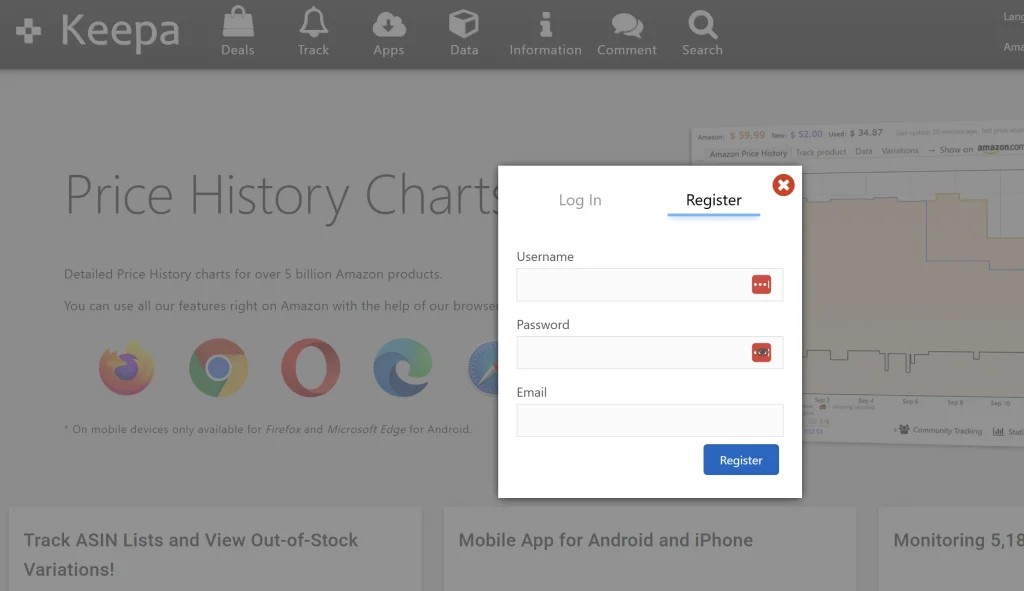
Getting started with Keepa is straightforward. Here’s a simplified step-by-step process:
- Visit the Keepa website
- Click “Log In/Register Now To Subscribe”
- Select “Register” and create your account with valid credentials
- Complete the verification process
- Navigate to your account menu by clicking your username
- Select “Subscriptions”
- Click “Subscribe”
- Enter your billing address and select your account type (individual or business)
- Provide payment details (credit card or Google Pay)
- Choose between monthly (€19) or annual (€189) billing
- Accept the terms of service and complete your subscription
It’s worth noting that all Keepa subscription billing is in Euros, so your payment may incur currency conversion fees depending on your bank or payment provider.
Saving Money on Your Keepa Subscription
While Keepa doesn’t offer promotional codes, there are legitimate ways to reduce your costs:
1. Annual Plan Savings
The most straightforward savings come from selecting the annual Keepa subscription plan, which effectively reduces your monthly cost to approximately €16 (about $17.50), saving you 17% compared to month-to-month billing.
2. Evaluate the Free Plan
Before committing to a paid Keepa subscription, thoroughly test the free plan to determine if it meets your basic needs. For occasional Amazon purchases or very casual selling, the free tier might be sufficient.
3. Consider FBAMultitool as an Alternative
FBAMultitool offers an attractive alternative to a standalone Keepa subscription. Starting at just $12.45 with discount code WOW30, FBAMultitool includes embedded Keepa functionality as part of its comprehensive seller toolkit.
For sellers who primarily need access to Keepa’s interactive graphs without requiring the full range of Keepa’s advanced features, FBAMultitool provides a cost-effective solution that integrates Keepa data with additional Amazon seller tools in one convenient package.
The Quota System Explained
A distinctive aspect of Keepa’s subscription model is its quota system, which governs how much data you can request daily.
With a 100% quota on the paid plan, you can import and export up to 24,000 ASINs through Product Viewer each day. This quota replenishes at a rate of 5% every hour, ensuring continuous access while preventing abuse of the system’s resources.
The free Keepa subscription, by comparison, has a 0% quota, making it ineligible for accessing any of the Data Access tools that are crucial for serious Amazon analysis.
FAQs About Keepa Subscriptions
Can I Cancel My Keepa Subscription Anytime?
Yes, you can cancel your Keepa subscription at any time. The cancellation will take effect at the end of your current billing period, whether monthly or annual. No refunds are issued for partial periods.
What Payment Methods Does Keepa Accept?
Keepa accepts major credit cards (Visa, Mastercard, American Express, Discover) and Google Pay. All payments are processed in Euros, so non-Euro users may incur currency conversion fees.
Does Keepa Offer Refunds?
Keepa does not typically offer refunds for subscription payments. Their terms state that all payments are non-refundable, so it’s advisable to thoroughly test the free plan before committing to a paid subscription.
Is Sharing a Keepa Subscription Allowed?
No, Keepa explicitly prohibits subscription sharing. Each subscription is intended for use by a single individual or business entity, and violating this policy may result in account termination.
What Happens When My Keepa Subscription Expires?
When your paid Keepa subscription expires, your account reverts to the free plan with all its limitations. You’ll lose access to the Data Access tools and interactive graphs until you renew your subscription.
Can I Switch Between Monthly and Annual Billing?
Yes, you can switch between monthly and annual Keepa subscription plans when your current billing cycle ends. This flexibility allows you to adjust your commitment level based on your business needs.
Keepa vs. FBAMultitool: Which Offers Better Value?

When evaluating your options for Amazon price tracking, it’s worth comparing a dedicated Keepa subscription against FBAMultitool’s integrated approach:
Keepa Subscription Strengths:
- Comprehensive data access
- Extensive historical tracking
- Dedicated focus on price history
- Full-featured API access (paid plans)
- Native mobile apps
FBAMultitool Advantages:
- Lower starting price ($12.45 with code WOW30)
- Embedded Keepa functionality
- Additional seller tools beyond price tracking
- All-in-one dashboard for Amazon selling
- No need for separate subscriptions
For sellers primarily focused on accessing Keepa’s interactive graphs and basic price tracking, FBAMultitool provides an economical alternative that includes these features along with additional seller tools, all at a lower entry price than a standard Keepa subscription.
Conclusion: Is a Keepa Subscription Worth It?
A Keepa subscription represents a valuable investment for serious Amazon sellers who need comprehensive price history data to make informed purchasing and selling decisions. At €19 monthly (or €189 annually), the cost is reasonable considering the potential profit opportunities it can uncover.
However, budget-conscious sellers should consider alternatives like FBAMultitool, which offers integrated Keepa functionality at a lower starting price point, potentially providing better overall value depending on your specific needs.
When evaluating whether a Keepa subscription makes sense for your business, consider:
- How frequently you’ll use the advanced data tools
- Whether the free plan meets your basic needs
- If a combined solution like FBAMultitool might offer better overall value
- The potential ROI from improved purchasing and pricing decisions
For most active Amazon sellers, some form of price history tracking is essential, and whether through a direct Keepa subscription or an integrated tool like FBAMultitool, the investment typically pays for itself many times over through improved sourcing and pricing strategies.


